Stage 1: Identity Integrity

Security Gateway

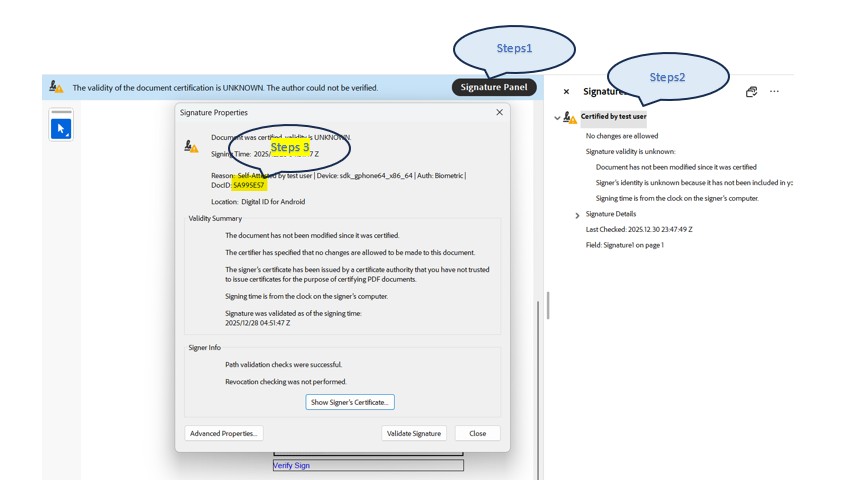
📖 Method A: Desktop / Standalone

Adobe Reader Verification
Steps to Unseal:
  1. Open PDF in Adobe Reader
  2. Click Signature Panel
  3. Verify Signature & Find DocID

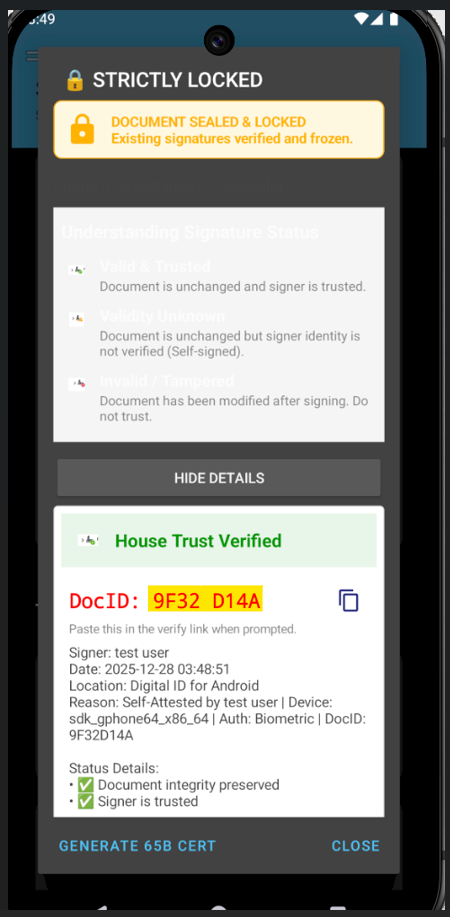
🚀 Method B: SelfAttest Mobile App

SelfAttest App Steps
Steps to Unseal:
  1. Open SelfAttest App
  2. Click Hamburger Menu (☰)
  3. Select Verify PDF Signature
(See screenshot for DocID location)

Enter the DocID found in the document signature:

⚠️ Symbols not allowed
Cryptographic Handshake Confirmation I have verified the document hash against the physical file.
?

Signer Name

Hardware-Bound Identity

Progress 0%
🔢
Document Integrity (CRC)
Pending hash verification...
🆔
Digital ID Verification
Waiting for cryptographic keys...
👤
Username Match
Comparing metadata attributes...
💾
Hardware Chip Authenticity
Handshaking with Secure Element...
🏭
Manufacturer Attestation
Verifying device origin...
🌍
Google Root Authority
Finalizing Android Keystore trust...
Initializing Core...
💎

COMPLETELY SEALED BY SILICON

100% Cryptographic & Human Trust Achieved

> ID: Sriram S
> DEVICE: STRONG BOX VERIFIED
> ATTESTATION: GOOGLE ROOT AUTH
> SEAL CODE: C644-99X6
> INTEGRITY: 100% UNTAMPERED / SEALED